Group lessons
Schedule one class for several students. Everyone pays less, you can earn more. Includes the full price and earnings tables.
In a group lesson several students share one lesson and each pays less than a one-to-one price. You schedule it, students join, and at a cutoff time the platform decides whether it goes ahead.
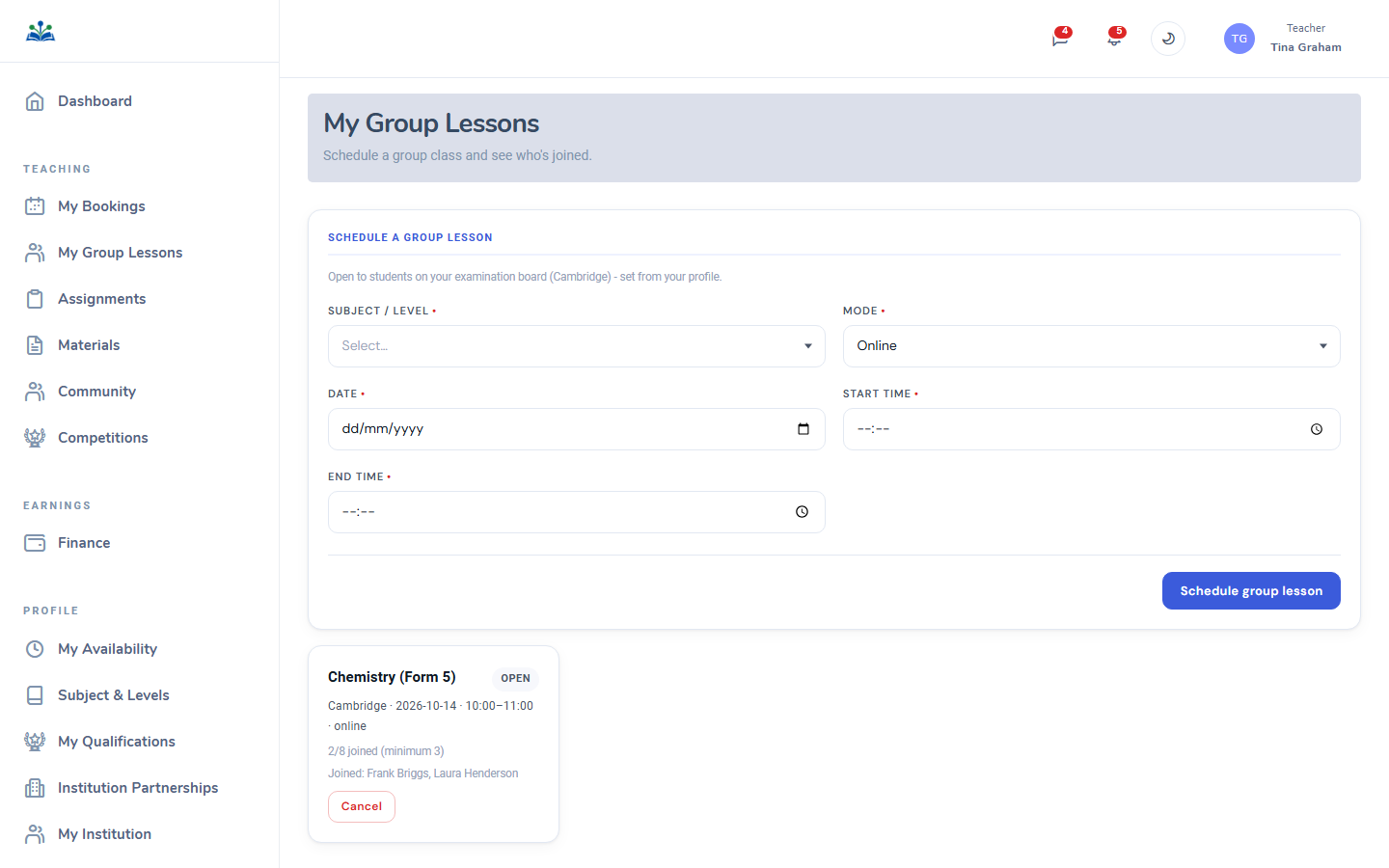
Schedule a group lesson
- Open TEACHING → My Group Lessons.
- In Schedule a group lesson, choose the subject / level (one you teach), the mode (Online or Physical), the date, and the start and end time.
- For a Physical lesson, choose the partnered institution whose venue you will use.
- Press Schedule group lesson.
The page reminds you: "Open to students on your examination board (Cambridge) - set from your profile." Only students on your board can join.
The platform refuses a lesson when:
| Problem | Message |
|---|---|
| The date is in the past | Cannot schedule a date in the past. |
| The end is not after the start | End time must be after start time. |
| You do not teach that subject and level | You don't teach this subject at this level. |
| Your delivery mode does not include it | You only offer … lessons. |
| A physical lesson has no venue | A physical group lesson needs a partnered institution's venue: there is no home-visit option for a group. |
| You have no approved partnership with that venue, or it has no venue rate | You aren't partnered with that institution yet. / contact an administrator |
| No rate is set for that subject, board and level | No rate has been set for this subject/board/level combination yet. |
| You already have something at that time | You already have something scheduled at this time. |
How a group lesson is decided
Nobody is charged when they join: joining is a reservation. The lesson is decided in one of two ways:
- It fills up. When the maximum number of students (8 by default) has joined, it is confirmed immediately and closes to new students.
- The cutoff arrives. At the join cutoff (24 hours before the start, by default) the platform confirms or cancels it.
Each lesson shows its state, for example OPEN · Cambridge · 2026-10-14 · 10:00–11:00 · online and 2/8 joined (minimum 3), with the names of those who have joined.
What happens at the cutoff
Assumptions: lesson Saturday 10:00; cutoff 24 hours (so the decision is on Friday 10:00); minimum 3; maximum 8; the platform runs an undersized lesson with at least 2 students.
| Students joined | When decided | Result |
|---|---|---|
| 8 | The moment the 8th joins | Confirmed at once and closed. |
| 5 | Friday 10:00 | Confirmed. Priced for 5 students. |
| 3 | Friday 10:00 | Confirmed. Minimum reached. |
| 2 | Friday 10:00 | Confirmed, even though it is below 3, because 2 is the lowest the platform allows. |
| 1 | Friday 10:00 | Cancelled. Nobody is charged. |
| 0 | Friday 10:00 | Cancelled (no students). |
Note
Students can leave for free while the lesson is still open. After it is confirmed, leaving is a normal cancellation. When a student joins, you get a notification.
What each student pays, and what you earn
Every student pays the same price, set by how many students there are when the lesson is confirmed:
- One-to-one price = hourly rate × hours.
- Extra students = students − the minimum (never below 0).
- Discount = discount rate × extra students.
- Price = one-to-one price × (1 − discount).
- The price never falls below one-to-one price × the price floor.
Up to the minimum number of students, everyone pays the full one-to-one price.
Example: the full table
Assumptions: rate $12.00 per hour, lesson 2 hours, so the one-to-one price is $24.00. Minimum 3, maximum 8, discount rate 0.100 (10% per extra student), price floor 0.500 (never below $12.00). Booking fee $1.00, commission 10%.
| Students | Extra beyond 3 | Discount | Price per student | Each student pays (+ $1.00 booking fee) | All lesson fees | You receive (after 10%) |
|---|---|---|---|---|---|---|
| 2 | 0 | 0% | $24.00 | $25.00 | $48.00 | $43.20 |
| 3 | 0 | 0% | $24.00 | $25.00 | $72.00 | $64.80 |
| 4 | 1 | 10% | $21.60 | $22.60 | $86.40 | $77.76 |
| 5 | 2 | 20% | $19.20 | $20.20 | $96.00 | $86.40 |
| 6 | 3 | 30% | $16.80 | $17.80 | $100.80 | $90.72 |
| 7 | 4 | 40% | $14.40 | $15.40 | $100.80 | $90.72 |
| 8 | 5 | 50% | $12.00 | $13.00 | $96.00 | $86.40 |
What this teaches you:
- Each student pays less as the group grows, from $24.00 down to $12.00.
- With these settings you earn the most with 6 or 7 students ($90.72), slightly less with 8 ($86.40), because the discount outgrows the extra student. Even so, 8 students at $12.00 each is a full class you earn well from, compared with $21.60 for a single one-to-one hour.
- The $1.00 booking fee is the same for everyone and is the platform's. You never receive it.
Example: a physical lesson at a partner venue
For a physical group lesson the venue fee is discounted the same way. The venue fee belongs to the institution, not to you; you still earn the lesson fee.
Assumptions: 2-hour lesson at $12.00 per hour, 5 students, minimum 3, discount 0.100, floor 0.500, venue fee $5.00 per hour (one-to-one venue price $10.00), booking fee $1.00.
| Line | Calculation | Each student pays |
|---|---|---|
| Lesson fee | $24.00 × (1 − 2 × 0.10) = $24.00 × 0.80 | $19.20 |
| Venue fee | $10.00 × 0.80 | $8.00 |
| Platform booking fee | flat | $1.00 |
| Total per student | $28.20 |
For the whole group of 5: lesson fees $96.00, venue fees $40.00, booking fees $5.00. With 10% commission you receive $86.40 and the institution receives $36.00.
Cancel a group lesson
Press Cancel on a lesson that is still OPEN to withdraw it. Nobody has been charged yet, so there is nothing to refund, and the students who joined are told. Do it early: they were counting on you.
Once a lesson has been confirmed it can no longer be cancelled from this page ("Cannot cancel a group lesson that is already confirmed"). Each student then has an ordinary confirmed booking, and if you cannot teach it you must cancel those bookings from My Bookings. That carries the same charge and strike as cancelling any confirmed lesson (see Cancelling and no-shows), so only schedule a group lesson you can keep.
Tip
Fill a group lesson faster by choosing an evening or weekend slot, a clear level, and a date at least a few days ahead so students have time to join before the cutoff.
Comments
Log in to read and add comments on this page.
Log in