EEduConnect Zimbabwe User manual
Log in

Money

How every dollar is split, how to see your balance and how to be paid.

Show as list

How you are paid: what a lesson earns you

Before you read the screens, it helps to see the whole journey of one payment. Every number below comes from settings that administrators control for the whole platform.

Who gets what

Money Who receives it
The lesson fee (hourly rate × hours) You, less the platform's commission.
The booking fee The platform. It is added on top for the student and you never receive it.
The commission (10% of the lesson fee by default) The platform.
The premium video fee (if the student chose full video) The platform. It is not part of your income.
A venue fee (a physical lesson at an institution's venue) The institution, not you.

Note

Commission is taken from the lesson fee only, and it is worked out when your payout is released, not when the student pays.

Example 1: a simple online lesson

Assumptions: the rate for your subject, board and level is $10.00 per hour; the booking is 1 hour; the booking fee is $1.00; the commission is 10%.

Step What happens Amount
1. The student books The lesson fee is fixed at today's rate. Lesson fee $10.00
2. The student pays Lesson fee plus booking fee. $11.00
3. The lesson happens The money is held. You are not paid yet.
4. Completion is confirmed See Completing a lesson. The payout is released.
5. Commission is taken 10% of the lesson fee $10.00 × 0.10 = $1.00
6. You are credited Lesson fee minus commission $9.00
Where the student's $11.00 went Amount
You $9.00
Platform: commission $1.00
Platform: booking fee $1.00
Total $11.00

Example 2: a physical lesson at a partner venue

Assumptions: same as above, plus the institution charges $4.00 per hour for its venue.

Line Gross Commission (10%) Who keeps it
Lesson fee $10.00 $1.00 You keep $9.00
Venue fee $4.00 $0.40 The institution keeps $3.60
Booking fee $1.00 none The platform keeps $1.00
Student paid $15.00 $1.40

Your income is the same as an online lesson, $9.00. The venue fee is on top for the student.

Example 3: a premium video lesson

Assumptions: a 2-hour online lesson at $10.00 per hour, the student chose Premium video, the premium video fee is $1.50 per lesson hour, booking fee $1.00, commission 10%.

Line Calculation Amount
Lesson fee $10.00 × 2 hours $20.00
Premium video fee $1.50 × 2 hours $3.00
Booking fee flat $1.00
Student pays $24.00
Commission 10% of the lesson fee only $2.00
You are credited $20.00 − $2.00 $18.00
The platform keeps $1.00 + $3.00 + $2.00 $6.00

Commission changes: what it means for you

Assumptions: a 1-hour lesson at $10.00.

Commission rate Commission You receive
5% $0.50 $9.50
10% $1.00 $9.00
15% $1.50 $8.50
20% $2.00 $8.00

The student always pays the same: only the split between you and the platform moves.

Group lessons and cancellations

  • For the prices in a group lesson, see Group lessons.
  • For what you are credited when a student cancels late, and what you are charged when you fail a lesson, see Cancelling and no-shows.

Finance: your balance and withdrawals

Finance: balance, withdrawal form and history

Finance: balance, withdrawal form and history

Open EARNINGS → Finance (in the app, More → Finance).

Your available balance

The box at the top says Available balance, for example $17.80, with the note "What's left to withdraw after commission and any pending/paid withdrawals."

The balance is worked out like this:

Available balance = everything you earned from lessons (after commission) + everything you earned from materials + any charges or credits adjustments − withdrawals you have already requested, approved or been paid.

Part Increases or decreases your balance
A lesson payout released Increases it by the lesson fee less commission.
A materials earning (a click on a free resource, or an ebook sale) Increases it.
A penalty for failing a confirmed lesson Decreases it. It can take the balance below zero.
A withdrawal you request Decreases it immediately, so the same money cannot be requested twice.
A withdrawal that is rejected The money returns to your balance.

Example

Assumptions: this month you earned $40.00 from lessons after commission and $0.60 from materials; you were charged $3.00 for a cancelled lesson; you have already withdrawn $10.00 (paid) and requested $10.00 that is still waiting.

Line Amount
Lessons + $40.00
Materials + $0.60
Penalty − $3.00
Withdrawals already paid − $10.00
Withdrawal waiting − $10.00
Available balance $17.60

Request a withdrawal

  1. In Request a withdrawal, enter the amount in US dollars.
  2. Choose the method: EcoCash, OneMoney, ZIPIT, Visa/Mastercard, PayPal or Bank transfer / other.
  3. Enter the destination: the phone number or account the money must go to.
  4. Press Request withdrawal.

Warning

Check the destination carefully. An administrator pays exactly what you typed, and a payment to a wrong number usually cannot be recovered.

The amount cannot be more than your available balance, and cannot be zero or less. You cannot withdraw while your balance is negative.

What happens to a request

Status in your history Meaning
REQUESTED Waiting for an administrator. The amount is already taken off your balance.
APPROVED Accepted. Waiting to be paid.
PAID The administrator has sent the money to your destination. You also get a Withdrawal paid notification.
REJECTED Not paid. The amount returns to your balance.

EduConnect does not send the money automatically: an administrator pays you by hand (for example an EcoCash transfer) and then marks it paid, so allow time. Ask support if a request has been waiting longer than the platform promises.
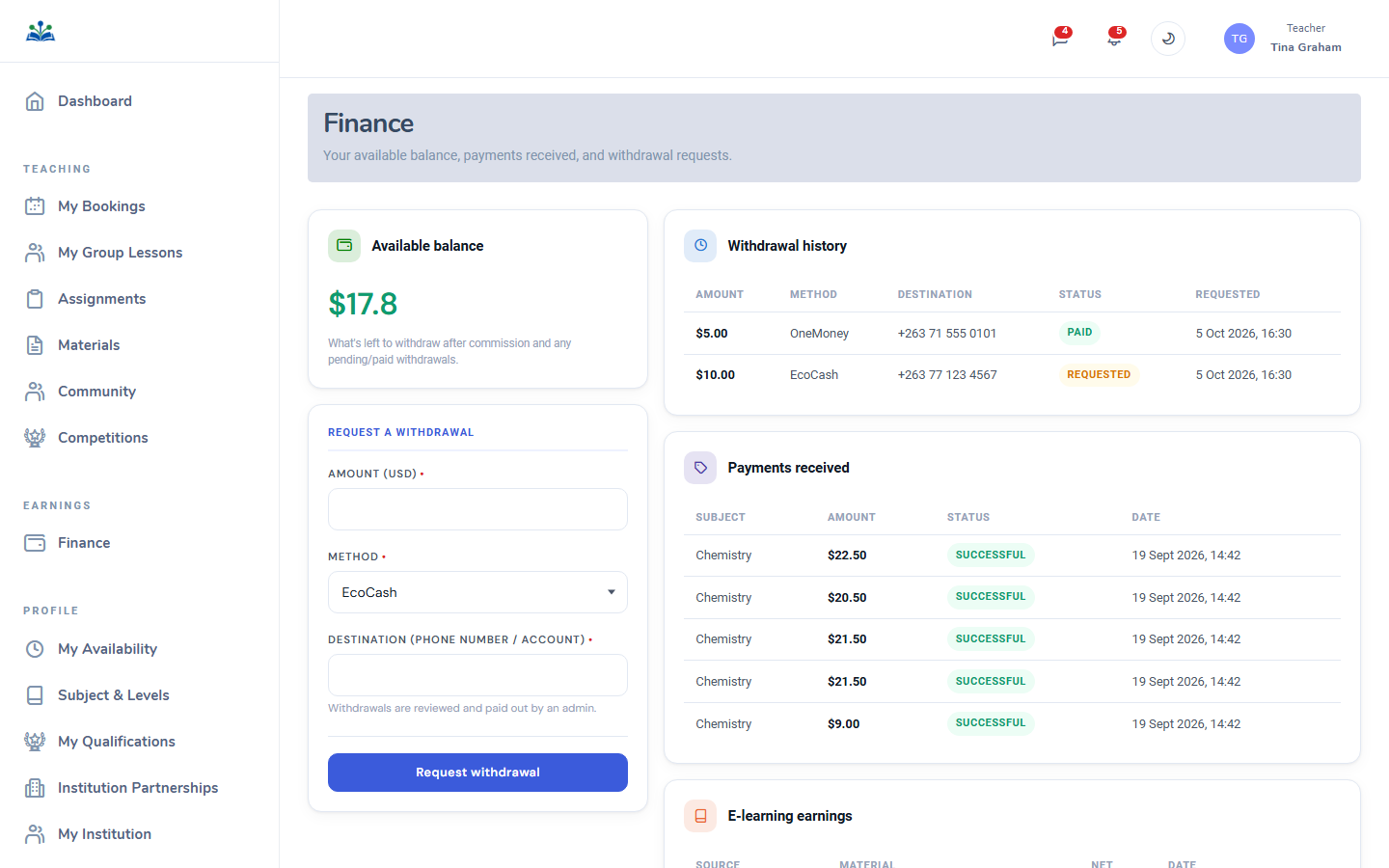
The history tables

Below the form you find three lists:

List What it shows
Withdrawal history Every request: amount, method, destination, status and date.
Payments received One row for each lesson payment you were credited for, with subject, amount, status (SUCCESSFUL) and date.
E-learning earnings Money from your materials: the source (for example Resource click), the material, the net amount and the date.

Tip

Make a habit of withdrawing a sensible amount at a time rather than very small amounts often. An administrator handles each request by hand.