Materials: resources and ebooks
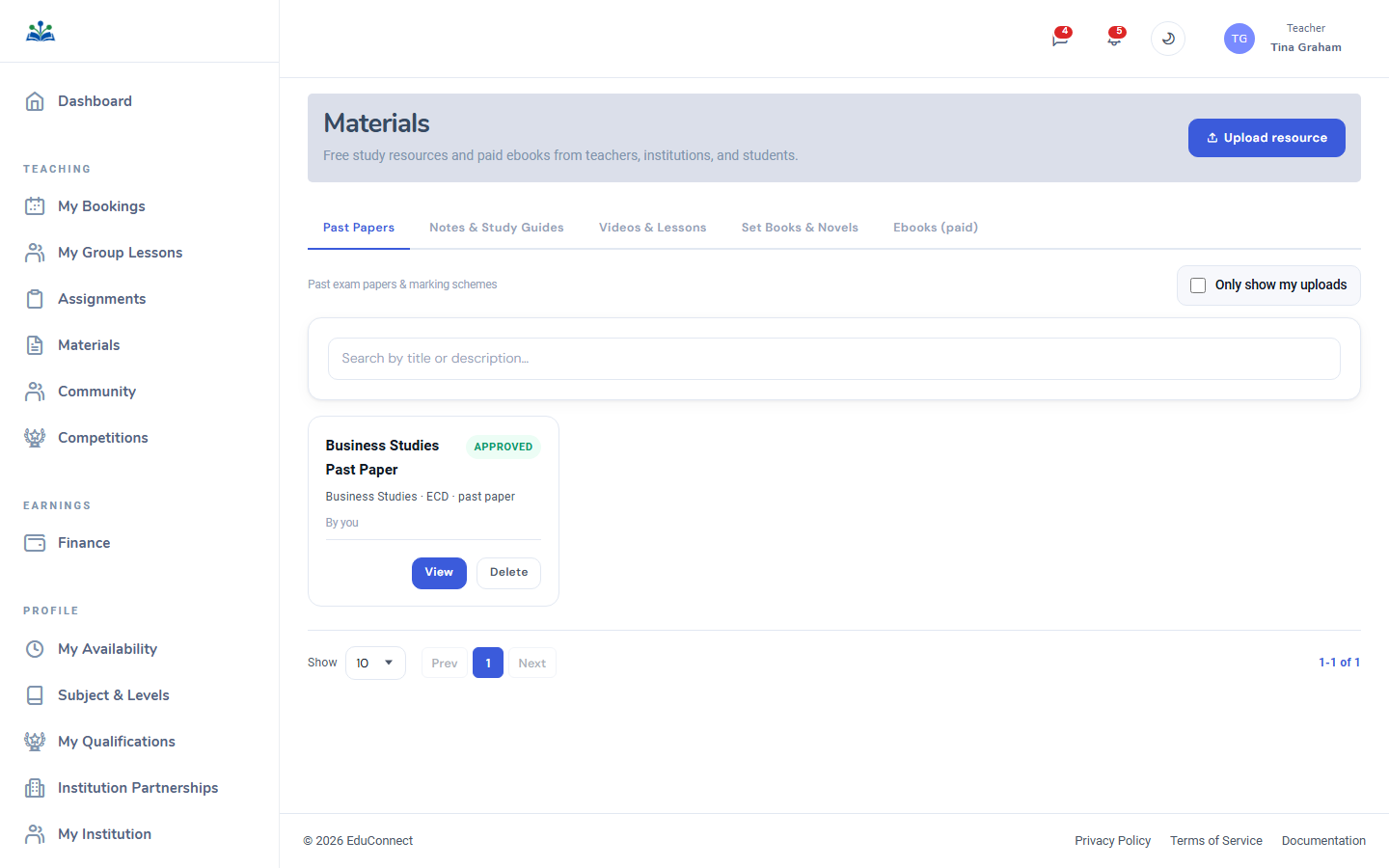
TEACHING → Materials is a library of free resources (notes, past papers, set books and so on) and paid ebooks. Use the tabs to browse by category: Past Papers, Notes & Study Guides, Videos & Lessons, Set Books & Novels and Ebooks (paid). Tick Only show my uploads to see just your own.
Upload a free resource
- Press Upload resource.
- Fill in the form and press Upload resource again.

| Field | What to enter |
|---|---|
| Title | A clear name. |
| Category | Green Book, Blue Book, Past Papers, Notes & Study Guides, Videos & Lessons or Set Books & Novels. |
| Type | Notes, Past paper, Marking scheme, Video, Recorded lesson, Quiz, Practice questions or Set book / novel. |
| Subject | The subject it belongs to. |
| Educational level category | For example O-Level or A-Level. Leave it blank if it applies to every level studying the subject. Past papers only exist per level category, not a specific grade or form. |
| Description | What is in it. |
| File | The document, image or video. A file is required for most categories; for Videos & Lessons you may give a video link instead. At least one of the two is required. |
The largest file you may upload is set by administrators (50 MB by default). The form tells you at once if a file is too large.
Approval
Depending on a platform setting, new uploads may need an administrator's approval before students can see them. By default both free and paid materials wait for approval. Your own uploads show a status:
| Status | Meaning |
|---|---|
| PENDING | Waiting for review. Only you can see it. |
| APPROVED | Live in the library. |
Use View to open a resource and Delete to remove one of yours.
Sell an ebook
- Open the Ebooks (paid) tab and press Upload ebook.
- Enter the title, the author, the price in US dollars, an optional cover image and the ebook file. Title, author, price and file are all required.
- Press Upload ebook.
Other users see it with a Buy for $… button; yours shows By you and Delete. Ebooks follow the same approval rule as resources.
How you earn from materials
| Kind | You earn | Cut taken |
|---|---|---|
| Free resource | A flat amount for each qualifying click: $0.02 by default. | None. |
| Ebook | The sale price, less the platform's commission (the same rate as lessons, 10% by default). | The commission. |
To stop someone refreshing a page to earn you money, a viewer's click on the same resource only pays once every 24 hours (by default). Every click still counts as a view; only some pay.
Example: click earnings
Assumptions: click rate $0.02, cooldown 24 hours.
| Who and when | Pays you? |
|---|---|
| Ana opens your resource Monday 09:00 | Yes, $0.02 |
| Ana opens it again Monday 15:00 | No (within 24 hours) |
| Ana opens it Tuesday 10:00 | Yes, $0.02 |
| Ben opens it Monday 09:30 | Yes, $0.02 (his own cooldown) |
That is $0.06. If 100 different students open it once each, you earn 100 × $0.02 = $2.00.
Example: an ebook sale
Assumptions: price $8.00, commission 10%. You receive $8.00 − $0.80 = $7.20 for each sale, shown in E-learning earnings on your Finance page.
Note
Earnings from materials join your available balance together with your lesson earnings, so one withdrawal covers both.