Using the app: the basics
Log in, find your way with the bottom tabs and the More menu, and see how the app differs from the website.
The EduConnect app does the same jobs as the website, arranged for a phone. You log in with the same account and see the same bookings, wallet and messages.
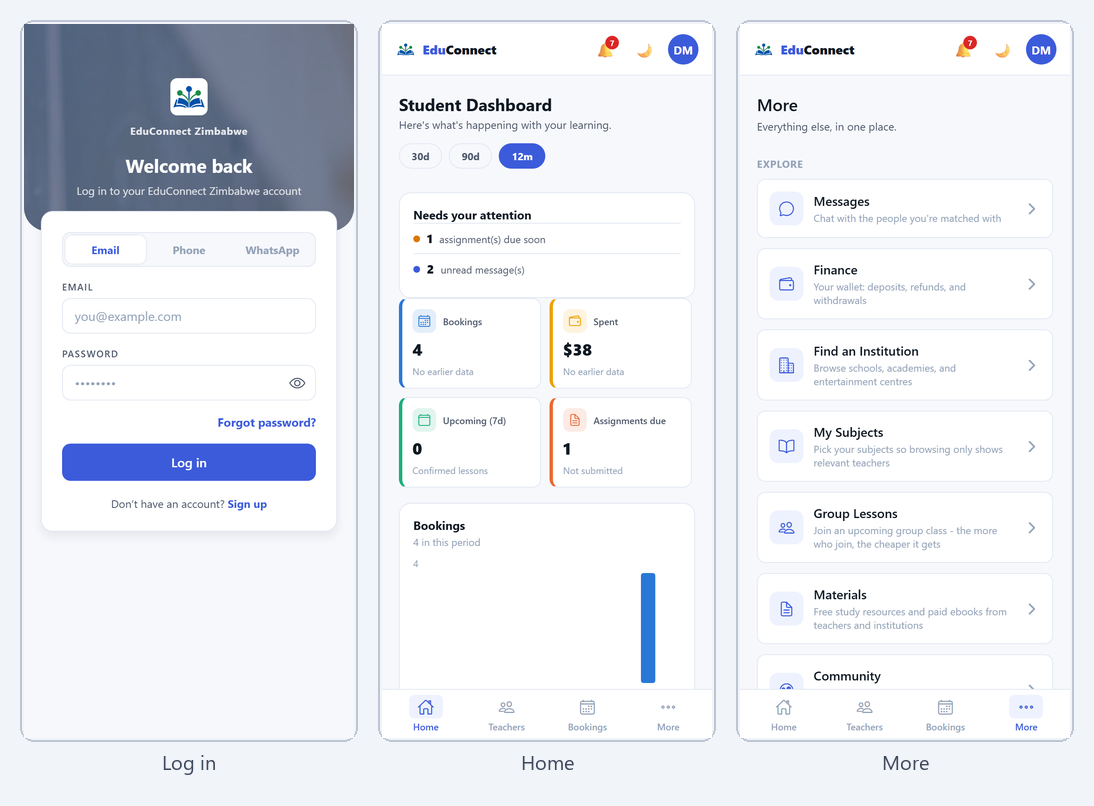
The bottom tabs
| Tab | What it is |
|---|---|
| Home | Your Student Dashboard: Needs your attention, Bookings, Spent, Upcoming (7d), Assignments due and charts. Use 30d, 90d or 12m to change the period. |
| Teachers | Find a teacher, with search, a Only show my subjects switch and filters. |
| Bookings | My Bookings, with the New booking button. |
| More | Everything else. |
The top bar shows the bell (with unread notifications), a moon for dark mode, and your initials.
The More menu
| In the app | On the website | Chapter |
|---|---|---|
| Messages | The speech-bubble icon | Messages |
| Finance | LEARNING → Finance | Wallet |
| Find an Institution | DISCOVER → Find an Institution | Institutions |
| My Subjects | PROFILE → My Subjects | My Subjects |
| Group Lessons | LEARNING → Group Lessons | Group lessons |
| Materials | LEARNING → Materials | Materials |
| Community, Competitions | LEARNING → Community, Competitions | Community |
| My Assignments | LEARNING → My Assignments | Assignments |
| Your name (under ACCOUNT) | Your profile | Your profile |
Note
The app keeps the screens you opened in memory. To go back, use the bottom tabs or the back arrow; tap More again to return to the menu.
What is different on a phone
| Website | App | |
|---|---|---|
| Video lessons | Opens the lesson room in the browser | Opens the call on your phone |
| Notifications | In the bell | In the bell, and as phone notifications when you allow them |
| Sign up | Yes | Yes (Sign up under Log in) |
Tip
The mobile screenshots in this manual are shown side by side so you can follow a whole task at a glance. Each phone screen has a caption underneath.
Comments
Log in to read and add comments on this page.
Log in